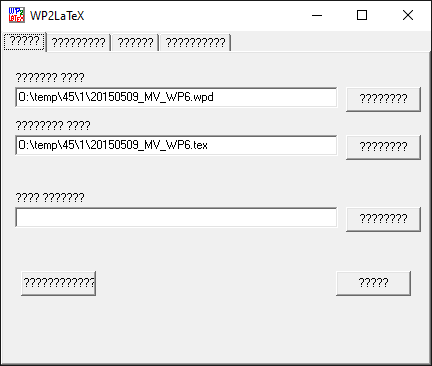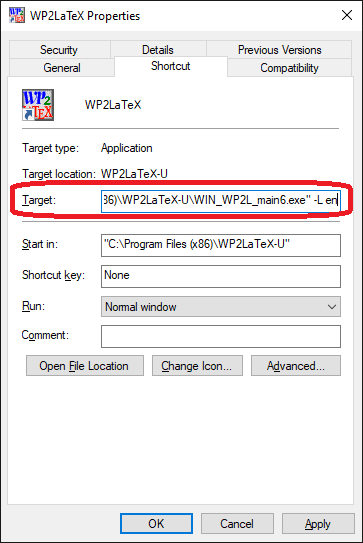
Please note that all command line arguments works also for windows port of WP2LaTeX. So you could create .pif file and place most frequent switches into a WP2LaTeX shortcut. Or you could have more shortcuts with some predefined options.
>>>WP2LaTeX<<< Conversion program: From Wordperfect to LaTeX Version 4.22
  (c) Made by J.Fojtik  ---- Date : 1996-2026

Write any suggestions, reports or bugs to address JaFojtik@seznam.cz
or JaFojtik@yandex.com.

Package signalling: '-' disabled, '+' enable on demand, '*' enabled always.

Parameters: WP2LATEX [switches] [input_file [output_file]] [switches]
   -?  --help   Display this help page.
   -configfile -@ filename   Load an external configuration file.
   -copyright   Display information about Copyright of WP2LaTeX.
   -cp-codepage Use "codepage" for output text. Supported code pages are
         "852"(ISO8), "866"(Russ), "895"(Kamenicky), "1250"(Win),
         "1251"(WinRuss), "ISO8859_1" ... "ISO8859-9", "KOI8R", "UTF8".
   -cp-styles   Turn on special styles for codepages.
   -CurrentFontSet  codepage    Change codepage for a current font.
               "Magical" WP's codepage 12. Same argunents as -cp-
   -epsfig      -Use style epsfig.sty for PostScript images.
   -extract-images Images will be extracted into separate files.
   -fancyhdr    Use package fancyhdr.sty for headers and footers
   -fig-output-dir Use this directory for storing images. Prefer relative path.
   -fix-spaces  Try to fix multiple spaces by ~.
   -force-xxx   Force of defined format xxx = WP4.x, WP5.x, HTML, RTF
   -FORCE-xxx   Like -force but override any attempt of autodetection.
   -graphics    -Use style graphics.sty for PostScript images.
   -graphicx    *Use style graphicx.sty for PostScript images.
   -charset1    *Switch internal WordPerfect charset to set 1.
   -charsetCZ   Switch internal WordPerfect charset to keybcs.
   -i; -o; -l   Explicitly define an input; output; log file
   -ignore-tabs Remove all [TAB] symbols from WP document.
   -image-path PATH/  Add one item to searching path for images.
   -input-PS    -Use PostScript features in the LaTeX (mainly images).
   -L LANGUAGE  Switch message translations to language LANGUAGE.
   -LaTeX2      Optimize output for LaTeX 2.09.
   -LaTeX3      *Optimize output for LaTeX 2e or LaTeX 3.0
   -LuaLaTeX    Optimize output for LuaLaTeX
   -no-FEATURE  Disable given feature. Available features are (accents, amssymb,
                 bbm, columns, extractWPG, fancyhdr, latexsym, texchars, wasy).
   -no-lang-XXX Disable language XXX in LaTeX.
   -no-safemode Disable checking features - faster conversion.
   -safemode    *Check safely consistency of each object and try to fix all
                incorrect things. Good for corrupted WP files.
   -s "password" Password for decoding WP document (WP4.x & WP5.x only).
   -S -silent   Switch to the silent mode.
   -texchars    *Do not interpret TeX macros (all chars 32-128 will not be
                converted to TeX sequences).
   -use-all     Use all character styles available (some graphic styles
                are mutually exclusive).
   -v           Get info about version.

Additional package list: (-disabled, +always, *used when necessary)
   -accents 	*Use accents to support additional accents.
   -Amssymb 	-Use AMSsymb with special characters.
   -arabtex 	*Use arabtex.sty to support arrabic glyphs.
   -Arevmath 	-Use arevmath with special characters.
   -AmsMath 	-Use AmsMath with special characters.
   -Bbm 	-Use Bbm with special characters.
   -Cyrillic 	*Use cyrillic.sty to support cyrillic script.
   -FontEnc-T1 	-Use package fontenc.sty [T1] with additional characters
   -latexsym 	*Use latexsym with special characters.
   -LongTable 	-Use longtable for better tables.
   -MakeIdx 	-Use makeidx for placing index.
   -mxedruli 	*Use mxedruli for Georgia characters.
   -PiFont 	*Use additional package pifont.
   -Rsfs 	-Use mathrsfs with special characters.
   -scalerel 	*Use additional package scalerel.
   -TIPA 	-Use TIPA.sty for IPA and other phonetic characters
   -Ulem 	*Use ulem for underlining and striking out.
   -Wasy 	-Use Wasy2 with special characters.
You can change startup language from 2 reasons. 1, you want to use your language. 2, special characters are corrupted and you
want to revert to english.
Example of font with special non ASCII glyphs corruption: